Prefered browser: Microsoft Edge 120+, Google Chrome 120+, or Mozilla Firefox 115+ for best performance.

Genomsawit Website
Official Portal Of
Malaysian Oil Palm Genome Programme (MyOPGP)


Prefered browser: Microsoft Edge 120+, Google Chrome 120+, or Mozilla Firefox 115+ for best performance.
MYPalmViewer is an oil palm genome browser developed to display and explore the chromosomes of the oil palm. This section provide a brief introduction on how to use MYPalmViewer
Accessing MYPalmViewer
The MyPalmViewer is an interactive genome browser designed to visualize oil palm genomic features such as genes, SNP markers, scaffolds, and annotations from the EG11 reference genome and related assemblies. Follow the steps below to explore and analyze the genome data efficiently. MYPalmViewer can be access via a direct link from this webpage (this is for whole genome browsing) or via blast analysis.
Use the Assembly selector (top-left corner) to choose from available genome builds:
The browser will automatically reload with the selected assembly.
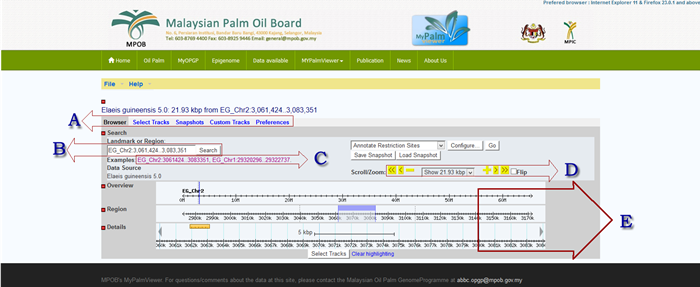
| Section | Description | |
|---|---|---|
| A | Gbrowse main menu | |
| Browser : | Webpage to visualize the oil palm genome | |
| Select tracks : | Tracks representing the mapped sequences to the oil palm genome. It allows users to select specific tracks in the browser. | |
| Snapshots : | Save the current browser screen as a picture | |
| Custom tracks : | It allows users to add a customized track to oil palm MYPalmViewer | |
| Preferences : | User screen configuration setting of MYPalmViewer | |
| B | It allows user to search the browser based on keyword and location on the browser. The format for location search is start with the oil palm chromosome number (example: EG_Chr[1 to 16]), a colon (:), start location and end location with a double dot (..) separator. Example: EG_Chr1:10..3000037 |
|
| C | Example of a browser view of a specific location in MYPalmViewer | |
| D | Scrool and zoom options in MYPalmViewer | |
| E | The selected tracks are visualize in section E. | |
MYPalmViewer allows user to upload own track data in six file format (BED, Gbrowse Feature File Format, GFF, GFF3, Wiggle (WIG) and BAM or SAM). Online data which can be reach through URL is also acceptable.
The BLAST results show an option to view the result in MYPalmViewer.